Wednesday, June 27, 2012
Convert Java Objects to / from JSON using Gson
No comments:
Labels:
gson,
java
Here is the example code which will give you the overview of gson
package com.file;
import java.io.BufferedReader;
import java.io.File;
import java.io.FileReader;
import java.io.FileWriter;
import java.io.IOException;
import java.lang.reflect.Type;
import java.util.ArrayList;
import java.util.Arrays;
import java.util.Iterator;
import java.util.List;
import com.google.gson.Gson;
import com.google.gson.reflect.TypeToken;
public class gsonObjectTry {
Gson gson = new Gson();
public static void main(String[] args) {
List<Student> students = new ArrayList<Student>();
students.add(new Student("kalees", "24", "e3084"));
students.add(new Student("muthu", "25", "e3085"));
new gsonObjectTry().createStudents(students);
// new gsonObjectTry().addStudent(new Student("newStudent", "25", "e3085"));
// new gsonObjectTry().deleteStudent(Arrays.asList(new Student("muthu", "25", "e3085")));
new gsonObjectTry().updateStudent(Arrays.asList(new Student("muthu", "25", "e9999")));
// new gsonObjectTry().addNewStudent(new Student("new Student", "25", "e1111"));
}
public void createStudents(List<Student> students) {
try {
//write converted json data to a file named "file.json"
File gsonFile = new File("/Users/kaleeswaran/Tried/gsonExample.json");
FileWriter writer = new FileWriter(gsonFile);
Gson gson = new Gson();
String jobJson = gson.toJson(students);
writer = new FileWriter(gsonFile);
writer.write(jobJson);
writer.flush();
System.out.println("Students created successfully");
} catch (IOException e) {
System.out.println("createStudents failed");
e.printStackTrace();
}
}
// normally added newly
public void addStudent(Student student) {
try {
//write converted json data to a file named "file.json"
File gsonFile = new File("/Users/kaleeswaran/Tried/gsonExample.json");
FileWriter writer = new FileWriter(gsonFile);
Gson gson = new Gson();
String jobJson = gson.toJson(student);
writer = new FileWriter(gsonFile);
writer.write(jobJson);
writer.flush();
System.out.println("Student created successfully");
} catch (IOException e) {
System.out.println("createStudents failed");
e.printStackTrace();
}
}
public void addNewStudent(Student student) {
try {
List<Student> students = null;
BufferedReader bufferedReader = new BufferedReader(new FileReader("/Users/kaleeswaran/Tried/gsonExample.json"));
Gson gson = new Gson();
Type type = new TypeToken<List<Student>>(){}.getType();
students = gson.fromJson(bufferedReader, type);
bufferedReader.close();
//write converted json data to a file named "file.json"
File gsonFile = new File("/Users/kaleeswaran/Tried/gsonExample.json");
FileWriter writer = new FileWriter(gsonFile);
students.add(student);
String jobJson = gson.toJson(students);
writer = new FileWriter(gsonFile);
writer.write(jobJson);
writer.flush();
System.out.println("Student created successfully");
} catch (IOException e) {
System.out.println("createStudents failed");
e.printStackTrace();
}
}
//build
public void deleteStudent(List<Student> deleteStudent) {
List<Student> students = null;
try {
BufferedReader bufferedReader = new BufferedReader(new FileReader("/Users/kaleeswaran/Tried/gsonExample.json"));
Gson gson = new Gson();
Type type = new TypeToken<List<Student>>(){}.getType();
students = gson.fromJson(bufferedReader, type);
bufferedReader.close();
//all values
Iterator<Student> iterator = students.iterator();
//deleteable values
for (Student selectedInfo : deleteStudent) {
while (iterator.hasNext()) {
Student itrStudent = iterator.next();
System.out.println("itrStudent.getName() ======> " + itrStudent.getName());
System.out.println("selectedInfo.getName() ======> " + selectedInfo.getName());
if (itrStudent.getName().equals(selectedInfo.getName())) {
iterator.remove();
break;
}
}
}
} catch (Exception e) {
System.out.println("Student removing failed");
}
//write back to file
try {
//write converted json data to a file named "file.json"
File gsonFile = new File("/Users/kaleeswaran/Tried/gsonExample.json");
FileWriter writer = new FileWriter(gsonFile);
String studentsJson = gson.toJson(students);
writer = new FileWriter(gsonFile);
writer.write(studentsJson);
writer.flush();
System.out.println("Student deleted successfully");
} catch (IOException e) {
System.out.println("delete Student failed");
e.printStackTrace();
}
}
public void updateStudent(List<Student> updateStudent) {
List<Student> students = null;
try {
BufferedReader bufferedReader = new BufferedReader(new FileReader("/Users/kaleeswaran/Tried/gsonExample.json"));
Gson gson = new Gson();
Type type = new TypeToken<List<Student>>(){}.getType();
students = gson.fromJson(bufferedReader, type);
bufferedReader.close();
//all values
Iterator<Student> iterator = students.iterator();
//deleteable values
for (Student selectedInfo : updateStudent) {
while (iterator.hasNext()) {
Student itrStudent = iterator.next();
System.out.println("itrStudent.getName() ======> " + itrStudent.getName());
System.out.println("selectedInfo.getName() ======> " + selectedInfo.getName());
if (itrStudent.getName().equals(selectedInfo.getName())) {
iterator.remove();
break;
}
}
}
students.addAll(updateStudent);
} catch (Exception e) {
System.out.println("Student updating failed");
}
//write back to file
// String studentsInfoJson = gson.toJson(students);
try {
//write converted json data to a file named "file.json"
File gsonFile = new File("/Users/kaleeswaran/Tried/gsonExample.json");
FileWriter writer = new FileWriter(gsonFile);
String studentsJson = gson.toJson(students);
writer = new FileWriter(gsonFile);
writer.write(studentsJson);
writer.flush();
System.out.println("Student updated successfully");
} catch (IOException e) {
System.out.println("delete updated failed");
e.printStackTrace();
}
}
}
class Student {
private String name;
private String age;
private String empNo;
public Student(String name, String age, String empNo) {
this.name = name;
this.age = age;
this.empNo = empNo;
}
public String getName() {
return name;
}
public void setName(String name) {
this.name = name;
}
public String getAge() {
return age;
}
public void setAge(String age) {
this.age = age;
}
public String getEmpNo() {
return empNo;
}
public void setEmpNo(String empNo) {
this.empNo = empNo;
}
}
--
Thank you.
Regards,
Kaleeswaran.S
package com.file;
import java.io.BufferedReader;
import java.io.File;
import java.io.FileReader;
import java.io.FileWriter;
import java.io.IOException;
import java.lang.reflect.Type;
import java.util.ArrayList;
import java.util.Arrays;
import java.util.Iterator;
import java.util.List;
import com.google.gson.Gson;
import com.google.gson.reflect.TypeToken;
public class gsonObjectTry {
Gson gson = new Gson();
public static void main(String[] args) {
List<Student> students = new ArrayList<Student>();
students.add(new Student("kalees", "24", "e3084"));
students.add(new Student("muthu", "25", "e3085"));
new gsonObjectTry().createStudents(students);
// new gsonObjectTry().addStudent(new Student("newStudent", "25", "e3085"));
// new gsonObjectTry().deleteStudent(Arrays.asList(new Student("muthu", "25", "e3085")));
new gsonObjectTry().updateStudent(Arrays.asList(new Student("muthu", "25", "e9999")));
// new gsonObjectTry().addNewStudent(new Student("new Student", "25", "e1111"));
}
public void createStudents(List<Student> students) {
try {
//write converted json data to a file named "file.json"
File gsonFile = new File("/Users/kaleeswaran/Tried/gsonExample.json");
FileWriter writer = new FileWriter(gsonFile);
Gson gson = new Gson();
String jobJson = gson.toJson(students);
writer = new FileWriter(gsonFile);
writer.write(jobJson);
writer.flush();
System.out.println("Students created successfully");
} catch (IOException e) {
System.out.println("createStudents failed");
e.printStackTrace();
}
}
// normally added newly
public void addStudent(Student student) {
try {
//write converted json data to a file named "file.json"
File gsonFile = new File("/Users/kaleeswaran/Tried/gsonExample.json");
FileWriter writer = new FileWriter(gsonFile);
Gson gson = new Gson();
String jobJson = gson.toJson(student);
writer = new FileWriter(gsonFile);
writer.write(jobJson);
writer.flush();
System.out.println("Student created successfully");
} catch (IOException e) {
System.out.println("createStudents failed");
e.printStackTrace();
}
}
public void addNewStudent(Student student) {
try {
List<Student> students = null;
BufferedReader bufferedReader = new BufferedReader(new FileReader("/Users/kaleeswaran/Tried/gsonExample.json"));
Gson gson = new Gson();
Type type = new TypeToken<List<Student>>(){}.getType();
students = gson.fromJson(bufferedReader, type);
bufferedReader.close();
//write converted json data to a file named "file.json"
File gsonFile = new File("/Users/kaleeswaran/Tried/gsonExample.json");
FileWriter writer = new FileWriter(gsonFile);
students.add(student);
String jobJson = gson.toJson(students);
writer = new FileWriter(gsonFile);
writer.write(jobJson);
writer.flush();
System.out.println("Student created successfully");
} catch (IOException e) {
System.out.println("createStudents failed");
e.printStackTrace();
}
}
//build
public void deleteStudent(List<Student> deleteStudent) {
List<Student> students = null;
try {
BufferedReader bufferedReader = new BufferedReader(new FileReader("/Users/kaleeswaran/Tried/gsonExample.json"));
Gson gson = new Gson();
Type type = new TypeToken<List<Student>>(){}.getType();
students = gson.fromJson(bufferedReader, type);
bufferedReader.close();
//all values
Iterator<Student> iterator = students.iterator();
//deleteable values
for (Student selectedInfo : deleteStudent) {
while (iterator.hasNext()) {
Student itrStudent = iterator.next();
System.out.println("itrStudent.getName() ======> " + itrStudent.getName());
System.out.println("selectedInfo.getName() ======> " + selectedInfo.getName());
if (itrStudent.getName().equals(selectedInfo.getName())) {
iterator.remove();
break;
}
}
}
} catch (Exception e) {
System.out.println("Student removing failed");
}
//write back to file
try {
//write converted json data to a file named "file.json"
File gsonFile = new File("/Users/kaleeswaran/Tried/gsonExample.json");
FileWriter writer = new FileWriter(gsonFile);
String studentsJson = gson.toJson(students);
writer = new FileWriter(gsonFile);
writer.write(studentsJson);
writer.flush();
System.out.println("Student deleted successfully");
} catch (IOException e) {
System.out.println("delete Student failed");
e.printStackTrace();
}
}
public void updateStudent(List<Student> updateStudent) {
List<Student> students = null;
try {
BufferedReader bufferedReader = new BufferedReader(new FileReader("/Users/kaleeswaran/Tried/gsonExample.json"));
Gson gson = new Gson();
Type type = new TypeToken<List<Student>>(){}.getType();
students = gson.fromJson(bufferedReader, type);
bufferedReader.close();
//all values
Iterator<Student> iterator = students.iterator();
//deleteable values
for (Student selectedInfo : updateStudent) {
while (iterator.hasNext()) {
Student itrStudent = iterator.next();
System.out.println("itrStudent.getName() ======> " + itrStudent.getName());
System.out.println("selectedInfo.getName() ======> " + selectedInfo.getName());
if (itrStudent.getName().equals(selectedInfo.getName())) {
iterator.remove();
break;
}
}
}
students.addAll(updateStudent);
} catch (Exception e) {
System.out.println("Student updating failed");
}
//write back to file
// String studentsInfoJson = gson.toJson(students);
try {
//write converted json data to a file named "file.json"
File gsonFile = new File("/Users/kaleeswaran/Tried/gsonExample.json");
FileWriter writer = new FileWriter(gsonFile);
String studentsJson = gson.toJson(students);
writer = new FileWriter(gsonFile);
writer.write(studentsJson);
writer.flush();
System.out.println("Student updated successfully");
} catch (IOException e) {
System.out.println("delete updated failed");
e.printStackTrace();
}
}
}
class Student {
private String name;
private String age;
private String empNo;
public Student(String name, String age, String empNo) {
this.name = name;
this.age = age;
this.empNo = empNo;
}
public String getName() {
return name;
}
public void setName(String name) {
this.name = name;
}
public String getAge() {
return age;
}
public void setAge(String age) {
this.age = age;
}
public String getEmpNo() {
return empNo;
}
public void setEmpNo(String empNo) {
this.empNo = empNo;
}
}
--
Thank you.
Regards,
Kaleeswaran.S

Thursday, May 24, 2012
Compile Jasper reports with Maven Plugin
2 comments:
Labels:
jaspereport,
maven,
plugin
jasperreports-maven-plugin is a plugin which is used to convert all the jrxml files(Designed templtes) to .jasper files.
<build>
<plugins>
<plugin>
<groupId>org.codehaus.mojo</groupId>
<artifactId>jasperreports-maven-plugin</artifactId>
<version>1.0-beta-2</version>
<executions>
<execution>
<goals>
<goal>compile-reports</goal>
</goals>
<configuration>
<!-- jrxml file directory-->
<sourceDirectory>src\\main\\resources\\reports\\template</sourceDirectory>
<sourceFileExt>.jrxml</sourceFileExt>
<compiler>net.sf.jasperreports.engine.design.JRJavacCompiler</compiler>
<!-- Destination for jasper file -->
<outputDirectory>src\\main\\resources\\reports\\jasper</outputDirectory>
</configuration>
</execution>
</executions>
<dependencies>
<!-- These plugins are used to specify correct version for jrxml xml validation -->
<dependency>
<groupId>net.sf.jasperreports</groupId>
<artifactId>jasperreports</artifactId>
<version>4.5.0</version>
</dependency>
<dependency>
<groupId>log4j</groupId>
<artifactId>log4j</artifactId>
<version>1.2.16</version>
</dependency>
</dependencies>
</plugin>
</plugins>
</build>
Add it in pom.xml. This is will do the compilation.
Regards,
Kaleeswaran.S
<build>
<plugins>
<plugin>
<groupId>org.codehaus.mojo</groupId>
<artifactId>jasperreports-maven-plugin</artifactId>
<version>1.0-beta-2</version>
<executions>
<execution>
<goals>
<goal>compile-reports</goal>
</goals>
<configuration>
<!-- jrxml file directory-->
<sourceDirectory>src\\main\\resources\\reports\\template</sourceDirectory>
<sourceFileExt>.jrxml</sourceFileExt>
<compiler>net.sf.jasperreports.engine.design.JRJavacCompiler</compiler>
<!-- Destination for jasper file -->
<outputDirectory>src\\main\\resources\\reports\\jasper</outputDirectory>
</configuration>
</execution>
</executions>
<dependencies>
<!-- These plugins are used to specify correct version for jrxml xml validation -->
<dependency>
<groupId>net.sf.jasperreports</groupId>
<artifactId>jasperreports</artifactId>
<version>4.5.0</version>
</dependency>
<dependency>
<groupId>log4j</groupId>
<artifactId>log4j</artifactId>
<version>1.2.16</version>
</dependency>
</dependencies>
</plugin>
</plugins>
</build>
Add it in pom.xml. This is will do the compilation.
Regards,
Kaleeswaran.S
Friday, January 20, 2012
JMeter Calculation
3 comments:
Labels:
calculation,
jmeter

Throughput Calculation In JMeter
- select a label name in result.xml which is generated by jmeter
- search the min (timestamp(ts)) for corresponding labels
- search the max (timestamp (ts) + elapsed time (t)) for corresponding labels.
- calculate the difference between max and min
- calculate Throughput= (number of samples/ difference between max and min) * 1000

- select a label name(Register) in result.xml which is generated by jmeter
- search the min (timestamp(ts)) 1327038233281 in result.xml
- search the max (timestamp (ts) + elapsed time (t)) 1327038233781 + 47.
- calculate the difference between max and min (1327038233828 - 1327038233281 ).. Diff ===> 547
- calculate Throughput= (number of samples/ difference between max and min) * 1000 (2/547) ... Result is.. 3.656307129798903107861060329067
- Round the Final throughput value.
ThroughPut = (No of sample / (max(ts + t) - min(ts)) )
standard devaiation(SD) =
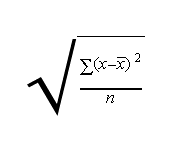
x_(x bar) = some of all time(T) of specific label / no of samples
No of samples specifies = number of occurrence of a label in xml file(No of hits of a label)
KB/SEC Calculation in JMeter
kb/sec = (avg bytes /1024) * through put
Avg bytes = avg bytes of specific label bytes (by).
Total Calculation in JMeter
When calculating total row values for jmeter we should not consider labels. Instead of that we have consider the whole xml file as data and we have to use the above formula to calculate it. Don't consider labels. In whole xml take max ts value and min ts and proceed and no of samples
(Total occurrence of all labels). for throughput.
For Standard deviation don't consider labels. Take whole xml.
xBar(x_) = sumOfTime(t) / totalNoOfSamples;
for (Integer time(t) : allTimes) {
// for each time we have to find this value
sumOfMean += Math.pow(time(t) - xBar(x_), 2);
}
Final calculation :
sqrt(sumOfMean / getNoOfSamples());
For KB/SEC calculation , don't consider labels , take all by values in xml file.
For Total row calculation formula is same but the only difference is , don't consider labels. Otherwise same.
Happy Coding :).
--
Thanks.
Chelladurai.
Regards,
Kaleeswaran.S
Friday, December 30, 2011
Starting with JPDA enabled Tomcat within Eclipse for Maven project
Starting with JPDA enabled Tomcat within Eclipse for Maven project
Thats Done....


Read More
Step 1 : Build the projects and place the war files in tomcat webapps folder.
Step 2 : Start your tomcat server.
Step 2 : Open the Eclipse , Specify java home in installed jres in eclipse(eclipse - > windows - > preferences)
Step 3 : Open Debug configuration in Eclipse
Step 4 : Select Connect tab select the project. Specify host as localhost and port as 8000(Which is specified in tomcat(catalina.bat jpda port 8000) ).
Step 5 : Select Source tab, select all the project folder you want.
Step 6 : Click debug.
Step 7 : Place break-points in code..
Thats Done....


Debug IT....
Thanks,
Arun..
Friday, October 21, 2011
Add Twitter to your webpage , Display Tweets using Java script
Hi, Everyone like to display tweets on their webpage. Twitter api provides the way to do it..
All you need to do is trigger a event in java script which retrives last 20 tweets. We can get tweets in two format xml and Json.. I prefer JSON which is very easy to use. I have used JSON. when page is loaed $.getJSON method is called and parameter is passed. i am parsing the return json data and appending it to the div element which shows all tweets.
But the problem is you can not refresh the page many times . i think 3 or 4 .. if u refresh more than 3 to 4 times. .Twitter server denies your request. You have to wait for some more time(Minimum 5 min. Not sure).. To avoid these kind of problem my solution would be to store values in cookies or in session...
<script type="text/javascript">
$(document).ready(function() {
$.getJSON("http://twitter.com/statuses/user_timeline/kaleeswaran14.json?callback=?", function(data) {
for(i in data) {
$('.scroll-hold').append('<div class="blog_twit"><div class="blog_twit_img"><img src="images/right1.png" border="0" alt="image"></div><div class="blog_twit_txt">'+data[i].text+'</div><div class="blog_twit_boder">'+parseTwitterDate(data[i].created_at)+'</div></div>');
}
});
});
function parseTwitterDate($stamp)
{
var date = $stamp;
return date.substr(0,16);
}
</script>
--
Thank you.
Regards,
Kaleeswaran.S
Read More
All you need to do is trigger a event in java script which retrives last 20 tweets. We can get tweets in two format xml and Json.. I prefer JSON which is very easy to use. I have used JSON. when page is loaed $.getJSON method is called and parameter is passed. i am parsing the return json data and appending it to the div element which shows all tweets.
But the problem is you can not refresh the page many times . i think 3 or 4 .. if u refresh more than 3 to 4 times. .Twitter server denies your request. You have to wait for some more time(Minimum 5 min. Not sure).. To avoid these kind of problem my solution would be to store values in cookies or in session...
<script type="text/javascript">
$(document).ready(function() {
$.getJSON("http://twitter.com/statuses/user_timeline/kaleeswaran14.json?callback=?", function(data) {
for(i in data) {
$('.scroll-hold').append('<div class="blog_twit"><div class="blog_twit_img"><img src="images/right1.png" border="0" alt="image"></div><div class="blog_twit_txt">'+data[i].text+'</div><div class="blog_twit_boder">'+parseTwitterDate(data[i].created_at)+'</div></div>');
}
});
});
function parseTwitterDate($stamp)
{
var date = $stamp;
return date.substr(0,16);
}
</script>
--
Thank you.
Regards,
Kaleeswaran.S
Subscribe to:
Posts (Atom)